Free, Personal, Team and Site, and adding a license
Arix is free on one computer, with no key. A license adds more: Personal for one person, Team and Site for an office. During the beta, licenses are free.
Free: no key needed
Download Arix and use it. With no license, Arix runs as Free Personal: one person on one Mac or PC, with chats, memory, the AI models it sets up for you, and a cloud model with your own key if you want one. It doesn't expire.
What each plan adds
- Personal
- Still one person. Adds more that Arix can do for you: browsing websites, texting from a Mac, and Arix Link to look after your other computers. Arix asks before it acts.
- Team
- For an office. One computer runs Arix for everyone; each person gets their own sign-in, chats and memory, and admins decide who may do what. Up to 10 people.
- Site
- Everything in Team, with no limit on people.
One license works on Macs and PCs alike. The full list is on Pricing.
The 14-day Team trial
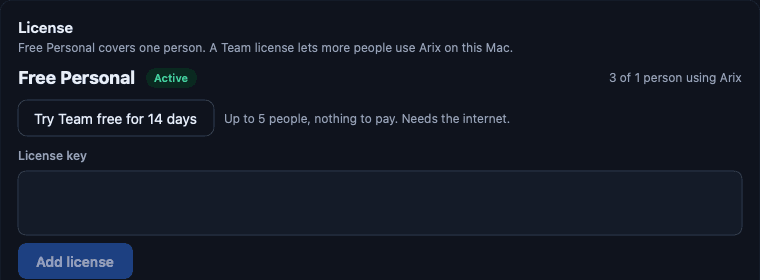
Want to try the office features first? In Arix, open Settings › License and click Try Team free for 14 days. The trial is for up to 5 people (a Team license is for up to 10), there's nothing to pay, and it needs the internet to start. Each computer can try it once.
Add a license
During the beta, Personal, Team and Site licenses are free for a year. Ask on the Download page; we email you a key that starts with ARIX-.
- In Arix, open Settings › License.
- Paste the whole line from the email into the box.
- Click Add license.
If a license ends
Nothing is deleted. Your chats, memory and files stay on your computer, and Arix goes back to Free until the license is renewed. To move a license to another computer, remove it on the old one and add it on the new one, or write to support@arixone.com and we'll move it.